
VIZA MASTER Admin: Powering Global Recruitment
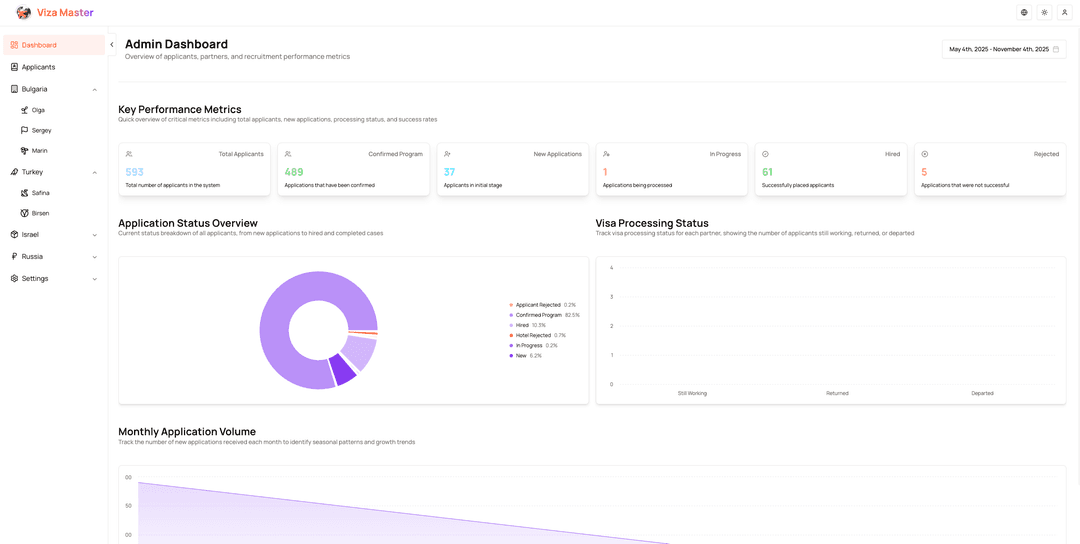
The VIZA MASTER Admin Dashboard is the control center for managing international job listings, countries, and content across three languages. It proves that admin interfaces can be both powerful and delightful to use.
The Admin Challenge
Managing a multilingual job board requires:
- Bulk operations – Creating and updating hundreds of listings efficiently
- Data validation – Ensuring content quality across languages
- File management – Uploading and organizing images for countries and jobs
- Real-time updates – Changes must reflect immediately on the public site
- Access control – Secure authentication for admin users only
This dashboard solves these challenges with a modern, type-safe architecture.
The Solution
📊 Data Management
- Interactive tables with sorting, filtering, and pagination
- Inline editing for quick updates
- Bulk delete operations
- Real-time search across all fields
- Export functionality for reporting
🖼️ Media Management
- Drag-and-drop image uploads with UploadThing
- Automatic CDN delivery and optimization
- Image preview before upload
- Error handling with user-friendly messages
- Progress indicators during upload
🔐 Security & Auth
- NextAuth with credentials provider
- Bcrypt password hashing
- Protected API routes
- Session-based access control
- Automatic logout on token expiration
⚡ Performance
- Server-side data fetching
- Optimistic UI updates
- Suspense boundaries for loading states
- Error boundaries for graceful failures
- React Query caching
Technical Architecture
Admin-Specific Features
TanStack Table Integration
The dashboard uses TanStack Table for enterprise-grade data management:
// components/admin/countries-table.tsx
const table = useReactTable({
  data: countries,
  columns: countryColumns,
  getCoreRowModel: getCoreRowModel(),
  getSortedRowModel: getSortedRowModel(),
  getFilteredRowModel: getFilteredRowModel(),
  getPaginationRowModel: getPaginationRowModel(),
  state: {
    sorting,
    columnFilters,
    pagination: { pageIndex: 0, pageSize: 10 },
  },
  onSortingChange: setSorting,
  onColumnFiltersChange: setColumnFilters,
})
Column Definitions with Actions
Each table includes action columns for CRUD operations:
const countryColumns: ColumnDef<Country>[] = [
  {
    accessorKey: 'name',
    header: ({ column }) => (
      <Button
        variant='ghost'
        onClick={() => column.toggleSorting(column.getIsSorted() === 'asc')}
      >
        Country Name
        <ArrowUpDown className='ml-2 h-4 w-4' />
      </Button>
    ),
    cell: ({ row }) => (
      <div className='font-medium'>{row.getValue('name')}</div>
    ),
  },
  {
    accessorKey: 'activeJobs',
    header: 'Active Jobs',
    cell: ({ row }) => {
      const count = row.original._count?.jobs || 0
      return (
        <Badge variant={count > 0 ? 'default' : 'secondary'}>{count}</Badge>
      )
    },
  },
  {
    id: 'actions',
    cell: ({ row }) => {
      const country = row.original
      return (
        <DropdownMenu>
          <DropdownMenuTrigger asChild>
            <Button variant='ghost' className='h-8 w-8 p-0'>
              <MoreHorizontal className='h-4 w-4' />
            </Button>
          </DropdownMenuTrigger>
          <DropdownMenuContent align='end'>
            <DropdownMenuItem onClick={() => handleEdit(country)}>
              Edit
            </DropdownMenuItem>
            <DropdownMenuItem onClick={() => handleDelete(country.id)}>
              Delete
            </DropdownMenuItem>
          </DropdownMenuContent>
        </DropdownMenu>
      )
    },
  },
]
Server-Side Data Fetching
The admin page fetches data on the server for optimal performance:
// app/[locale]/admin/page.tsx
export default async function AdminDashboard() {
  const session = await getServerSession(authOptions)

  if (!session) {
    redirect('/auth/signin')
  }

  const [countries, vacancies, stats] = await Promise.all([
    fetchAllCountries(),
    fetchAllVacancies(),
    fetchDashboardStats(),
  ])

  return (
    <div className='space-y-8'>
      <DashboardStats stats={stats} />

      <Tabs defaultValue='countries'>
        <TabsList>
          <TabsTrigger value='countries'>Countries</TabsTrigger>
          <TabsTrigger value='vacancies'>Vacancies</TabsTrigger>
        </TabsList>

        <TabsContent value='countries'>
          <CountriesTable initialData={countries} />
        </TabsContent>

        <TabsContent value='vacancies'>
          <VacanciesTable initialData={vacancies} />
        </TabsContent>
      </Tabs>
    </div>
  )
}
Protected File Uploads
UploadThing routes verify admin authentication:
// app/api/uploadthing/core.ts
import { createUploadthing, type FileRouter } from 'uploadthing/next'
import { getServerSession } from 'next-auth'

const f = createUploadthing()

const handleAdmin = async () => {
  const session = await getServerSession(authOptions)

  if (!session?.user) {
    throw new Error('Unauthorized')
  }

  return { userId: session.user.id }
}

export const ourFileRouter = {
  countryImage: f({ image: { maxFileSize: '4MB', maxFileCount: 1 } })
    .middleware(handleAdmin)
    .onUploadComplete(async ({ metadata, file }) => {
      console.log('Country image uploaded by:', metadata.userId)
      console.log('File URL:', file.url)
      return { uploadedBy: metadata.userId, url: file.url }
    }),

  jobImage: f({ image: { maxFileSize: '2MB', maxFileCount: 3 } })
    .middleware(handleAdmin)
    .onUploadComplete(async ({ metadata, file }) => {
      console.log('Job images uploaded by:', metadata.userId)
      return { uploadedBy: metadata.userId, url: file.url }
    }),
}
Optimistic Updates with React Query
Mutations update the UI immediately while syncing with the server:
// hooks/use-countries.ts
export function useDeleteCountry() {
  const queryClient = useQueryClient()

  return useMutation({
    mutationFn: async (countryId: string) => {
      const response = await fetch(`/api/countries/${countryId}`, {
        method: 'DELETE',
      })
      if (!response.ok) throw new Error('Failed to delete country')
      return response.json()
    },
    onMutate: async (countryId) => {
      // Cancel outgoing refetches
      await queryClient.cancelQueries({ queryKey: ['countries'] })

      // Snapshot previous value
      const previous = queryClient.getQueryData(['countries'])

      // Optimistically update
      queryClient.setQueryData(['countries'], (old: Country[]) =>
        old.filter((country) => country.id !== countryId)
      )

      return { previous }
    },
    onError: (err, countryId, context) => {
      // Rollback on error
      queryClient.setQueryData(['countries'], context?.previous)
      toast({
        title: 'Error',
        description: 'Failed to delete country',
        variant: 'destructive',
      })
    },
    onSettled: () => {
      // Refetch after mutation
      queryClient.invalidateQueries({ queryKey: ['countries'] })
    },
  })
}
Optimistic updates make the UI feel instant while maintaining data consistency. If the server request fails, React Query automatically rolls back the optimistic update.
Code Highlights
Dashboard Statistics
Real-time stats provide insights at a glance:
// components/admin/dashboard-stats.tsx
export function DashboardStats({ stats }: { stats: DashboardStats }) {
  return (
    <div className='grid gap-4 md:grid-cols-2 lg:grid-cols-4'>
      <Card>
        <CardHeader className='flex flex-row items-center justify-between space-y-0 pb-2'>
          <CardTitle className='text-sm font-medium'>Total Countries</CardTitle>
          <Globe className='h-4 w-4 text-muted-foreground' />
        </CardHeader>
        <CardContent>
          <div className='text-2xl font-bold'>{stats.totalCountries}</div>
          <p className='text-xs text-muted-foreground'>
            +{stats.newCountriesThisMonth} this month
          </p>
        </CardContent>
      </Card>

      <Card>
        <CardHeader className='flex flex-row items-center justify-between space-y-0 pb-2'>
          <CardTitle className='text-sm font-medium'>Active Jobs</CardTitle>
          <Briefcase className='h-4 w-4 text-muted-foreground' />
        </CardHeader>
        <CardContent>
          <div className='text-2xl font-bold'>{stats.activeJobs}</div>
          <p className='text-xs text-muted-foreground'>
            {stats.pendingJobs} pending approval
          </p>
        </CardContent>
      </Card>

      <Card>
        <CardHeader className='flex flex-row items-center justify-between space-y-0 pb-2'>
          <CardTitle className='text-sm font-medium'>Applications</CardTitle>
          <Users className='h-4 w-4 text-muted-foreground' />
        </CardHeader>
        <CardContent>
          <div className='text-2xl font-bold'>{stats.totalApplications}</div>
          <p className='text-xs text-muted-foreground'>
            +{stats.applicationsThisWeek} this week
          </p>
        </CardContent>
      </Card>

      <Card>
        <CardHeader className='flex flex-row items-center justify-between space-y-0 pb-2'>
          <CardTitle className='text-sm font-medium'>Success Rate</CardTitle>
          <TrendingUp className='h-4 w-4 text-muted-foreground' />
        </CardHeader>
        <CardContent>
          <div className='text-2xl font-bold'>{stats.successRate}%</div>
          <p className='text-xs text-muted-foreground'>
            +{stats.successRateChange}% from last month
          </p>
        </CardContent>
      </Card>
    </div>
  )
}
Form with Image Upload
// components/admin/country-form.tsx
<Form {...form}>
  <form onSubmit={form.handleSubmit(onSubmit)} className='space-y-6'>
    <FormField
      control={form.control}
      name='name'
      render={({ field }) => (
        <FormItem>
          <FormLabel>Country Name</FormLabel>
          <FormControl>
            <Input placeholder='United States' {...field} />
          </FormControl>
          <FormMessage />
        </FormItem>
      )}
    />

    <FormField
      control={form.control}
      name='imageUrl'
      render={({ field }) => (
        <FormItem>
          <FormLabel>Country Image</FormLabel>
          <FormControl>
            <UploadDropzone
              endpoint='countryImage'
              onClientUploadComplete={(res) => {
                field.onChange(res?.[0].url)
                toast({
                  title: 'Success',
                  description: 'Image uploaded successfully',
                })
              }}
              onUploadError={(error) => {
                toast({
                  title: 'Error',
                  description: error.message,
                  variant: 'destructive',
                })
              }}
            />
          </FormControl>
          {field.value && (
            <div className='relative h-40 w-40'>
              <Image
                src={field.value}
                alt='Country preview'
                fill
                className='rounded-lg object-cover'
              />
            </div>
          )}
          <FormMessage />
        </FormItem>
      )}
    />

    <Button type='submit' disabled={isSubmitting}>
      {isSubmitting ? 'Saving...' : 'Save Country'}
    </Button>
  </form>
</Form>
Demo
Impact & Learnings
What This Dashboard Delivers:
✅ Empowers non-technical staff – No code required to manage content
✅ Scales with data growth – Handles thousands of listings efficiently
✅ Prevents errors – Type-safe forms with runtime validation
✅ Feels instant – Optimistic updates make operations snappy
Key Technical Achievements:
- TanStack Table provides enterprise features with minimal configuration
- Server components reduce client JavaScript and improve initial load
- Optimistic updates make the UI feel responsive even with slow networks
- Protected uploads ensure only authenticated admins can modify content
- Type safety from database to UI prevents runtime errors
Architecture Lessons:
- Server-side data fetching improves performance and SEO
- Optimistic updates should always include rollback logic
- File upload middleware must verify authentication server-side
- Table state should be managed locally for better UX
- Error boundaries prevent crashes from propagating
This admin dashboard demonstrates that internal tools can be as polished as customer-facing products. The patterns here—protected file uploads, optimistic updates, and server-side data fetching—transfer to any admin interface or CMS.
Explore the source code on GitHub to see the full implementation!