
VIZA MASTER: Connecting Global Talent
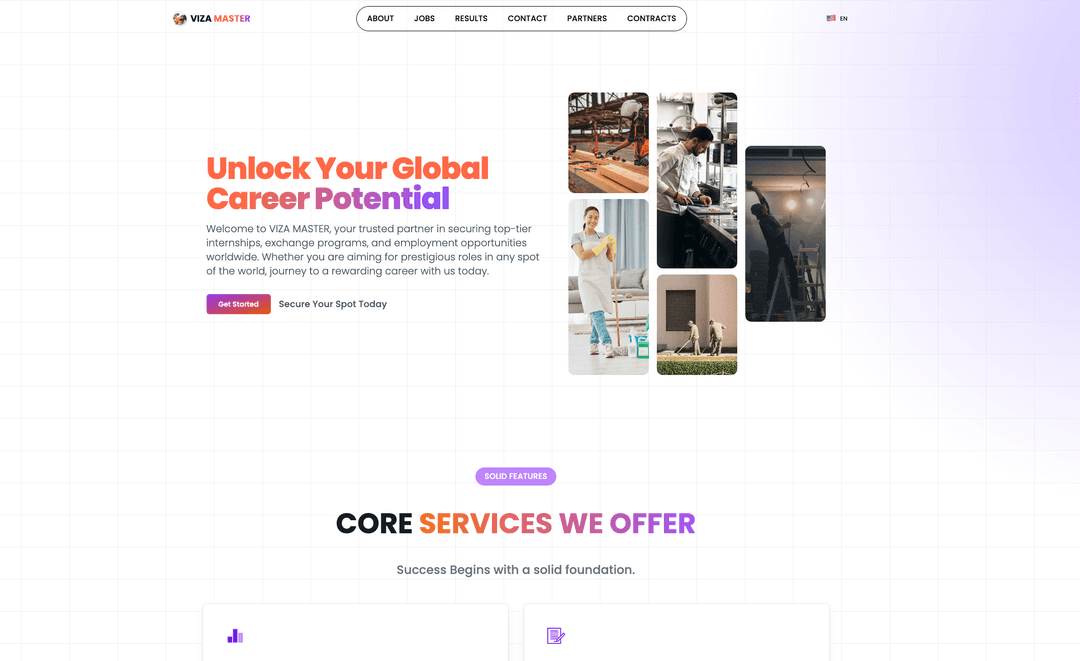
VIZA MASTER is a full-stack recruitment platform that helps companies find international talent while providing job seekers with opportunities worldwide. Built with Next.js 14, it delivers a seamless experience in English, Russian, and Uzbek.
The Challenge
International recruitment faces unique challenges:
- Language barriers – Job seekers and employers speak different languages
- Content management – Updating job listings across languages is tedious
- Geographic complexity – Matching candidates to opportunities across countries
- Trust and verification – Ensuring legitimate opportunities and candidates
- Admin efficiency – Managing hundreds of listings without dedicated CMS
VIZA MASTER solves these challenges with a modern, multilingual platform that scales.
The Solution
🌍 Multilingual Experience
- Full localization in English, Russian, and Uzbek
- Automatic locale detection and routing
- SEO-optimized pages in all languages
- Localized error messages and validation
💼 Job Seeker Features
- Browse opportunities by country and category
- Interactive 3D globe showing hiring hotspots
- Detailed job descriptions with requirements
- Direct application through contact forms
- Email notifications via EmailJS
🏢 Employer Tools
- Secure admin dashboard for job management
- Country and vacancy CRUD operations
- Image uploads with UploadThing
- Real-time content updates
- Analytics and performance tracking
🔐 Enterprise Security
- NextAuth credentials provider
- Bcrypt password hashing
- Protected admin routes
- Session management with JWT
- CSRF protection
Technical Architecture
The Modern Stack
- Next.js 14 App Router – Server components and streaming
- Prisma – Type-safe database access with PostgreSQL
- NextAuth – Authentication and session management
- next-intl – Internationalization with routing
- TanStack Query – Server state management
- TanStack Table – Data tables with sorting/filtering
- UploadThing – File uploads with CDN delivery
- EmailJS – Contact form email delivery
- Zod – Runtime validation
- Tailwind CSS – Utility-first styling
Internationalization Architecture
Localization is handled at the layout level with next-intl:
// app/[locale]/layout.tsx
export default function LocaleLayout({
  children,
  params: { locale },
}: {
  children: React.Node
  params: { locale: string }
}) {
  setRequestLocale(locale)

  return (
    <html lang={locale} suppressHydrationWarning>
      <body className={cn(poppins.className)}>
        <AppProvider>
          <Suspense fallback={<Loading />}>{children}</Suspense>
          <Toaster />
          <Analytics />
        </AppProvider>
      </body>
    </html>
  )
}
Routing configuration defines supported locales:
// i18n/routing.ts
export const routing = defineRouting({
  locales: ['en', 'ru', 'uz'],
  defaultLocale: 'en',
  localePrefix: 'always',
  pathnames: {
    '/': '/',
    '/about': '/about',
    '/jobs': '/jobs',
    '/partners': '/partners',
    '/contact': '/contact',
  },
})
State Management
TanStack Query handles server state with custom configuration:
// providers/query-provider.tsx
const [queryClient] = useState(
  () =>
    new QueryClient({
      defaultOptions: {
        queries: {
          retry: 0,
          refetchOnMount: false,
          refetchOnWindowFocus: false,
          refetchOnReconnect: false,
        },
        mutations: {
          retry: 0,
        },
      },
      queryCache: new QueryCache({
        onError: (error, query) => {
          console.error('Query error:', error)
        },
      }),
      mutationCache: new MutationCache({
        onError: (error, mutation) => {
          console.error('Mutation error:', error)
        },
      }),
    })
)
This configuration:
- Disables aggressive refetching to reduce server load
- Centralizes error handling
- Enables React Query DevTools in development
- Maintains cache across route transitions
Authentication Flow
NextAuth uses a credentials provider with Prisma:
// lib/auth.ts
async authorize(credentials) {
  const { email, password, name } = credentials

  const user = await DB.admin.findUnique({
    where: { email },
  })

  if (user) {
    const isPasswordCorrect = await bcrypt.compare(password, user.password)
    if (!isPasswordCorrect) return null
    return user
  } else {
    // Auto-create first admin
    const hashedPassword = await bcrypt.hash(password, 10)
    const newUser = await DB.admin.create({
      data: { name, email, password: hashedPassword },
    })
    return newUser
  }
}
The session callback adds the user ID to the JWT:
callbacks: {
  async jwt({ token, user }) {
    if (user) {
      token.id = user.id
    }
    return token
  },
  async session({ session, token }) {
    if (session.user) {
      session.user.id = token.id
    }
    return session
  },
}
Admin Dashboard
The dashboard fetches data server-side and hydrates client tables:
// app/[locale]/admin/page.tsx
export default async function AdminPage() {
  const countriesData = await fetchAllCountries()
  const vacanciesData = await fetchAllVacancies()

  return (
    <div className='space-y-8'>
      <TableClientWrapper tableType='countries' initialData={countriesData} />
      <TableClientWrapper tableType='vacancies' initialData={vacanciesData} />
    </div>
  )
}
TanStack Table provides sorting, filtering, and pagination:
// components/admin/table-client-wrapper.tsx
const table = useReactTable({
  data,
  columns,
  getCoreRowModel: getCoreRowModel(),
  getSortedRowModel: getSortedRowModel(),
  getFilteredRowModel: getFilteredRowModel(),
  getPaginationRowModel: getPaginationRowModel(),
  state: {
    sorting,
    columnFilters,
    pagination,
  },
  onSortingChange: setSorting,
  onColumnFiltersChange: setColumnFilters,
  onPaginationChange: setPagination,
})
File Upload Security
UploadThing routes are protected with admin authentication:
// app/api/uploadthing/core.ts
const handleAdmin = async () => {
  const session = await getServerSession(authOptions)
  if (!session?.user) throw new Error('Unauthorized')
  return { userId: session.user.id }
}

export const ourFileRouter = {
  imageUploader: f({ image: { maxFileSize: '4MB' } })
    .middleware(handleAdmin)
    .onUploadComplete(async ({ metadata, file }) => {
      console.log('Upload complete for userId:', metadata.userId)
      console.log('File URL:', file.url)
    }),
}
Interactive Globe Visualization
The jobs page features a dynamic 3D globe showing hiring locations:
// app/[locale]/jobs/page.tsx
const countries = await fetchCountriesWithActiveJobCounts()
const vacanciesCount = countries.reduce(
  (total, c) => total + (c._count.jobs || 0),
  0
)

const GlobeView = useMemo(
  () => dynamic(() => import('./globe-comp'), { ssr: false }),
  []
)

return (
  <div className='grid gap-8 lg:grid-cols-2'>
    <div className='space-y-4'>
      {countries.map((country) => (
        <CountryCard key={country.id} country={country} />
      ))}
    </div>
    <div className='sticky top-24'>
      <GlobeView countries={countries} />
    </div>
  </div>
)
The globe is dynamically imported with SSR disabled because it requires
browser APIs. The useMemo prevents re-importing on
every render.
Code Highlights
Contact Form with Validation
// components/contact-form.tsx
const form = useForm<ContactFormValues>({
  resolver: zodResolver(contactSchema),
  defaultValues: {
    name: '',
    email: '',
    message: '',
  },
})

const onSubmit = async (values: ContactFormValues) => {
  try {
    await emailjs.send(
      process.env.NEXT_PUBLIC_EMAILJS_SERVICE_ID!,
      process.env.NEXT_PUBLIC_EMAILJS_TEMPLATE_ID!,
      {
        from_name: values.name,
        from_email: values.email,
        message: values.message,
      },
      process.env.NEXT_PUBLIC_EMAILJS_PUBLIC_KEY!
    )

    toast({
      title: t('success.title'),
      description: t('success.description'),
    })

    form.reset()
  } catch (error) {
    toast({
      title: t('error.title'),
      description: t('error.description'),
      variant: 'destructive',
    })
  }
}
Prisma Singleton
// lib/database/prisma.ts
import { PrismaClient } from '@prisma/client'

const globalForPrisma = global as unknown as { prisma: PrismaClient }

export const DB = globalForPrisma.prisma || new PrismaClient()

if (process.env.NODE_ENV !== 'production') globalForPrisma.prisma = DB
Demo
Impact & Learnings
What This Project Delivers:
✅ Breaks language barriers – Seamless experience in 3 languages
✅ Scales globally – Country-based job organization
✅ Empowers admins – No-code content management
✅ Builds trust – Professional design and secure authentication
Key Technical Achievements:
- next-intl makes multilingual routing elegant and SEO-friendly
- Server components reduce client JavaScript and improve performance
- TanStack Table provides enterprise-grade data tables with minimal code
- UploadThing simplifies file uploads with built-in CDN
- Prisma ensures type safety from database to UI
Architecture Lessons:
- Locale-based routing should happen at the layout level
- Query configuration should disable aggressive refetching for admin dashboards
- File uploads must be protected with server-side authentication checks
- Dynamic imports with SSR disabled are essential for browser-only libraries
- Singleton pattern prevents Prisma client duplication in development
This platform demonstrates that modern web apps can serve global audiences without sacrificing developer experience. The patterns here—multilingual routing, protected file uploads, and server-side data fetching—transfer to any international SaaS product.
Explore the source code on GitHub to see the full implementation!