
3D Portfolio: Where Code Meets Art
Most developer portfolios look the same—a grid of project cards and a contact form. This portfolio is different. It's an interactive 3D experience that feels more like a miniature game than a website, proving that technical skill and creativity aren't mutually exclusive.
The Vision
I wanted to introduce myself in a way that stands out in a sea of templates. The goal: blend narrative, motion, and content into something memorable—a 3D island you can spin, planes looping overhead, and project showcases that feel alive.
What Makes It Special
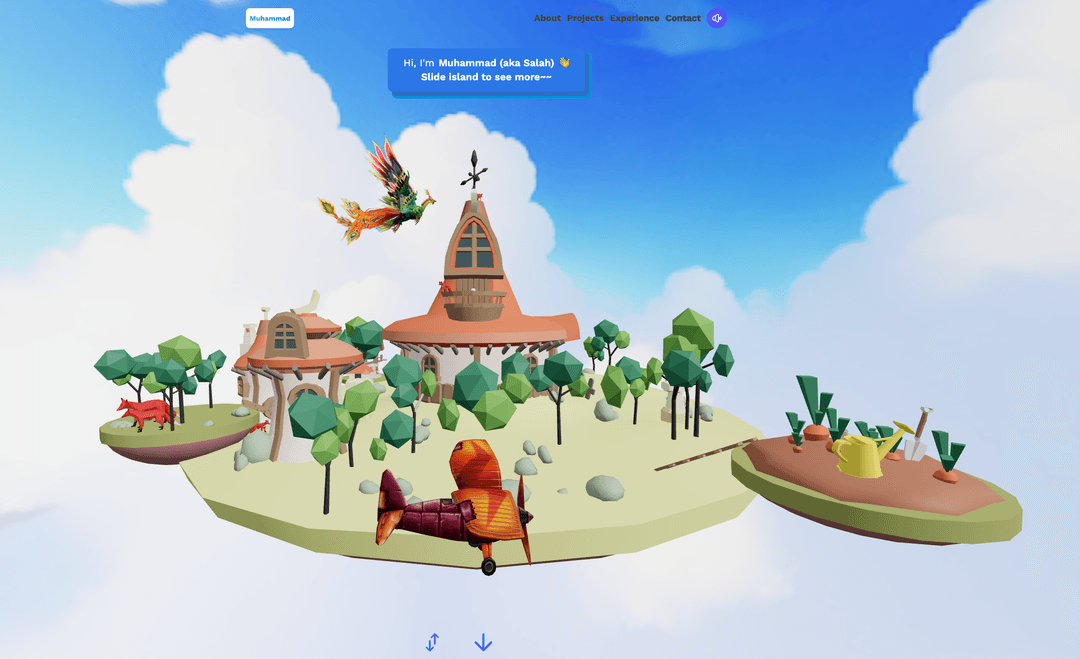
🎮 Interactive 3D Hero
- Draggable floating island with physics-based rotation
- Animated planes and rockets that loop through the scene
- Dynamic camera angles that reveal different CTAs
- Swap-able environments (fox island vs. alternate scenes)
- Touch and wheel input support for mobile
🎨 Cinematic Presentation
- WebGL-powered visuals using React Three Fiber
- Smooth animations with react-spring
- Atmospheric audio soundtrack with play/pause control
- Loading states with custom 3D loader
📱 Multi-Page Experience
- Home – Interactive 3D landing with rotating island
- About – Bio and developer journey
- Projects – Highlighted work with live demos
- Experience – Career timeline
- Contact – Form with animated fox mascot
🦊 Delightful Details
- Fox character with idle, walk, and reaction animations
- EmailJS integration for contact form
- Toast notifications with custom styling
- Responsive design that works on all devices
Technical Architecture
The Stack
- Vite + React – Lightning-fast development with HMR
- React Three Fiber – Declarative WebGL with Three.js
- React Router – Client-side routing
- Drei – Helper components for R3F (useGLTF, useAnimations)
- react-spring – Physics-based animations
- Tailwind CSS – Utility-first styling
- EmailJS – Contact form backend
How It Works
Routing Shell
The app wraps a shared Navbar and Footer around nested routes. Home lives at the root while other pages load their own sections inside the shell.
Hero Canvas
The home page renders two stacked Canvas instances from React Three Fiber. Each loads GLB assets with Drei's useGLTF, lights the scene, and orchestrates state-driven interactions.
Model Controllers
Components like Island, FlyingPlane, and Fox encapsulate each 3D model. They hook into:
useFramefor per-frame updatesuseAnimationsfor baked animation clips- Manual event listeners for drag-to-rotate behavior
Data-Driven Sections
Project tiles pull from a centralized constants file, making it painless to update copy, badges, and links in one place.
GLB components were generated with pmndrs' gltfjsx
tool, so every model ships as a typed JSX wrapper. This keeps transforms and
materials co-located with React state.
Code Highlights
Interactive Island Scene
The heart of the landing page: a responsive canvas that swaps islands and updates UI as you rotate:
// src/pages/Home.jsx
const Home = () => {
  const [isRotating, setIsRotating] = useState(false)
  const [currentStage, setCurrentStage] = useState(1)
  const [swapIslands, setSwapIslands] = useState('foxIsland')

  const [isIslandPosition, isIslandScale, isIslandRotation] =
    adjustIslandForScreenSize()

  return (
    <section className='relative h-dvh w-full overflow-hidden'>
      <div className='absolute'>
        {currentStage && <HomeInfo currentStage={currentStage} />}
      </div>

      <Canvas
        className={`h-dvh w-full ${isRotating ? 'cursor-grabbing' : 'cursor-grab'}`}
      >
        <Suspense fallback={<Loader />}>
          <directionalLight position={[1, 1, 1]} intensity={2} />
          {swapIslands === 'foxIsland' ? (
            <Island
              position={isIslandPosition}
              scale={isIslandScale}
              rotation={isIslandRotation}
              isRotating={isRotating}
              setIsRotating={setIsRotating}
              setCurrentStage={setCurrentStage}
            />
          ) : (
            <Island2 />
          )}
          <FlyingPlane isRotating={isRotating} />
        </Suspense>
      </Canvas>
    </section>
  )
}
Drag-to-Rotate Physics
The island listens for pointer events and applies damped rotation:
// src/models/Island.jsx
const Island = ({ isRotating, setIsRotating, setCurrentStage, ...props }) => {
  const islandRef = useRef()
  const lastX = useRef(0)
  const rotationSpeed = useRef(0)
  const dampingFactor = 0.95

  const handlePointerDown = (event) => {
    setIsRotating(true)
    lastX.current = event.touches ? event.touches[0].clientX : event.clientX
  }

  const handlePointerMove = (event) => {
    if (isRotating) {
      const clientX = event.touches ? event.touches[0].clientX : event.clientX
      const delta = (clientX - lastX.current) / viewport.width
      islandRef.current.rotation.y += delta * 0.01 * Math.PI
      rotationSpeed.current = delta * 0.01 * Math.PI
      lastX.current = clientX
    }
  }

  useFrame(() => {
    if (!isRotating) {
      rotationSpeed.current *= dampingFactor
      if (Math.abs(rotationSpeed.current) < 0.001) rotationSpeed.current = 0
      islandRef.current.rotation.y += rotationSpeed.current
    }
  })

  return (
    <a.group ref={islandRef} {...props}>
      {/* 3D meshes */}
    </a.group>
  )
}
Contact Form with Animation
The contact page toggles fox animations based on user interaction:
// src/pages/Contacts.jsx
const [currentAnimation, setCurrentAnimation] = useState('idle')

const handleSubmit = async (e) => {
  e.preventDefault()
  setIsLoading(true)
  setCurrentAnimation('hit')

  try {
    await emailjs.send(
      SERVICE_ID,
      TEMPLATE_ID,
      {
        from_name: form.name,
        to_name: 'Salah',
        from_email: form.email,
        to_email: 'contact@salah.dev',
        message: form.message,
      },
      PUBLIC_KEY
    )

    setCurrentAnimation('idle')
    showAlert({ show: true, text: 'Message sent!', type: 'success' })
  } catch (error) {
    setCurrentAnimation('idle')
    showAlert({ show: true, text: 'Failed to send', type: 'danger' })
  } finally {
    setIsLoading(false)
  }
}
Demo
Impact & Learnings
What This Project Proves:
✅ WebGL is accessible – React Three Fiber makes 3D approachable for React developers
✅ Performance matters – Proper asset optimization keeps 60fps on mobile
✅ Storytelling wins – Interactive experiences are more memorable than static pages
✅ Tools accelerate creativity – Drei and gltfjsx eliminate boilerplate
Key Takeaways:
- React Three Fiber brings declarative patterns to WebGL—game-changer for React devs
- GLB models are production-ready when optimized (use Draco compression)
- Physics-based animations feel more natural than easing functions
- Audio adds atmosphere but needs user-initiated playback for mobile
- Suspense boundaries prevent layout shift during asset loading
This build reaffirmed that WebGL doesn't have to be intimidating when you stay inside React and lean on modern tooling. By pairing a traditional router with 3D scenes, I kept content maintainable while shipping something unforgettable.
Fork it, remix it, make it yours – the code is on GitHub!